
10 Free OSINT Tools for Username Investigations
By David James · Published · Updated · 7 min read · Editorial policy
Free, no sign-up. Checks 3,450+ sites; the username is not stored or logged.
A username investigation means searching one handle across many sites to find the accounts and mentions linked to it. A username is often the thread that ties someone's online life together. People reuse handles for years, across forums, games, code hosts and social apps. That makes username searches one of the most productive starting points in open-source intelligence, and there are plenty of free tools for it.
Key takeaways
- For a quick browser check, start with the WhatsMyName web interface or our own search. No install needed.
- For scripted runs, use Sherlock. For deep runs with reports, use Maigret.
- Holehe starts from an email, the Wayback Machine finds deleted profiles, and search operators find mentions.
- A matching handle on two sites is a lead, not proof that one person owns both.
This list sticks to tools that are free to use, actively published, and that we checked against their own documentation in October 2026.
How we checked (October 2026): we read each tool's official README or home page and took site counts and licenses from there. We did not benchmark the tools against each other. Some are command-line programs, some run in a browser, and a few are not username tools at all but belong in the same workflow. Our OSINT tools hub has longer write-ups for several of them.
Trademark note: all tool and project names belong to their respective owners. FreeUsername is not affiliated with any of the projects listed.
Before you start
Get permission first. Every tool below can be misused. Use them on your own accounts, on brands you represent, or within an investigation you are authorized to carry out. Do not use them to track down, harass or expose private people. Results are leads: a matching username on two sites does not mean the same person owns both accounts.
Username search tools
These six tools take a username and check it across many sites.
1. WhatsMyName web interface
The WhatsMyName project maintains a community dataset, wmn-data.json, that describes how to check hundreds of sites for a username. Its README points to a free web interface at whatsmyname.app, with category filters and export. It needs no installation, which makes it a good first stop. The data is licensed CC BY-SA 4.0, and many other tools build on it. See our WhatsMyName overview.
2. Sherlock
Sherlock is the best-known command-line username checker. It covers 400+ social networks, takes several usernames per run, and saves results as TXT, CSV or XLSX. It is MIT licensed and installs with pipx install sherlock-project or Docker. Pick it when you want something simple and scriptable. Our Sherlock guide covers the flags.
3. Maigret
Maigret began as a Sherlock fork. Its README lists 5,900 supported sites, with a default run covering the top 500 by traffic. It extracts profile details, searches recursively on usernames and IDs it discovers, and writes HTML, PDF, XMind, JSON and CSV reports. There is a built-in web interface too. It is the deepest free option on this list and also the slowest. More in our Maigret guide.
4. Blackbird
Blackbird searches for accounts by username and by email. Its username checks use the WhatsMyName dataset, which the README puts at more than 600 platforms, and results export to PDF and CSV. It also has an optional AI profiling feature. The author marks the tool as for educational use, so read the README before you use it at work.
5. Social Analyzer
Social Analyzer checks around 1,000 sites and is available as a web app, a CLI, a Python package and a Node.js package. Instead of a plain yes or no, it gives each match a rating from 0 to 100 based on several detection techniques. That rating is handy for sorting out weak matches. It is licensed AGPL-3.0.
6. SpiderFoot
SpiderFoot is a broader OSINT automation framework with over 200 modules and a web interface. It is not a username tool first, but its Account Finder module looks for associated accounts on more than 500 sites. Use it when a username is one part of a larger investigation that also covers domains, IP addresses and email addresses. It is MIT licensed.
Tools that pair with a username search
These four tools fill the gaps a username checker leaves.
7. Holehe
Holehe starts from an email address instead of a username. It checks whether the email is registered on more than 120 sites by looking at how their password reset pages respond. It is useful when the investigation began with an email and you want to know which platforms to look at for a handle. It is GPL-3.0 licensed and installs with pip.
8. The Wayback Machine
Profiles get renamed, deleted and locked down. The Internet Archive's Wayback Machine often has older snapshots of profile pages, which can show a previous display name, bio or linked website. Paste the profile URL in and browse the capture dates. If a username tool reports a profile as Not found, the archive may still have it.
9. Search engine operators
Plain search is still one of the best OSINT tools. Search for the exact handle in quotes, add site: to limit results to one domain, and use - to drop noise. Searching "handle" -site:example.com finds mentions of a username outside its main platform, such as forum signatures, old blog comments and conference speaker pages. These mentions are often more revealing than the profiles themselves.
10. OSINT Framework
The OSINT Framework, created by Justin Nordine, is a clickable directory of free OSINT resources grouped by data type, including a username section. It does not run searches itself. Use it to discover tools for platforms or data types this list doesn't cover. Some linked resources require registration or have paid tiers.
Quick comparison
Here is how the ten tools differ at a glance.
| Tool | Type | Starts from | Best for |
|---|---|---|---|
| WhatsMyName web | Web | Username | Quick checks without installing |
| Sherlock | CLI | Username | Simple, scriptable runs |
| Maigret | CLI and web UI | Username | Deep investigations with reports |
| Blackbird | CLI | Username or email | WhatsMyName data plus email search |
| Social Analyzer | Web app, CLI, libraries | Username | Rated matches |
| SpiderFoot | Web UI and CLI | Many data types | Wider investigations |
| Holehe | CLI | Finding where an email is registered | |
| Wayback Machine | Web | URL | Deleted or changed profiles |
| Search operators | Web | Text | Mentions outside profiles |
| OSINT Framework | Directory | Data type | Finding more tools |
Free OSINT tools online, no install needed
Four tools here run in a browser with nothing to install. Not everyone wants to set up Python or Docker. If you are looking for free OSINT tools online that run in a browser, four from this list qualify: the WhatsMyName web interface, the Wayback Machine, search engine operators and the OSINT Framework directory. Social Analyzer and Maigret also have web interfaces, but you host those yourself. Browser tools are the easier start; command-line tools win when you need to repeat a run, script it or keep a precise record of what you ran.
People sometimes search "OSINT open" when they mean open-source in both senses: open-source intelligence, and open-source code you can inspect. Most tools here are both. Sherlock, Maigret, Blackbird, Social Analyzer, SpiderFoot and Holehe publish their code and licenses on GitHub, and the WhatsMyName dataset is openly licensed. That matters for investigators, because you can see exactly how a tool decides that a profile exists and explain it later. The Wayback Machine and the OSINT Framework are free web services rather than code you run. For the fonts and logo sources we credit, see the open-source credits.
Where FreeUsername fits
Our tool is a browser option with its own engine. We did not put our own tool in the numbered list, but it is worth knowing about if you prefer a browser. FreeUsername is free, needs no sign-up, and checks 3,450+ sites with its own search engine and its own detection rule for each site. It is an independent project. Results come back as Found, Not found, Blocked or Unknown. Found results show the public display name, avatar and bio where available. You can search up to five usernames at once and export JSON or CSV, and there is a public RDAP check for .com, .net, .org, .io, .us, .app and .dev domains.
The username is sent to our server only to run the check, and we don't store or log it. There is no API or CLI, so for automation stick with the command-line tools above. To try it, search a username now, or read the OSINT username search page for a walkthrough aimed at investigators.
A simple workflow that combines them
Combine one broad tool, one deep tool and the archive.
- Run the handle through one broad web tool to see the spread of results.
- Run Sherlock or Maigret on the same handle and compare. Sites found by only one tool deserve a closer look.
- Open every Found profile. Note the display name, photo, bio, links and join date.
- Use search operators and the Wayback Machine to find mentions and older versions.
- Record what you confirmed and what is still a guess. Keep the two lists apart.
Say you are auditing your own old handle, nightowl92. Our search gives you the spread across 3,450+ sites. Sherlock finds a forum ours missed, so you open it and confirm it is your 2014 account. A quoted search for "nightowl92" turns up an old blog comment, and the Wayback Machine shows the forum profile once listed your city. You delete the forum account and note the comment as confirmed. Note that our search does not check Instagram or Threads automatically, so check those by hand.
If the investigation is about you, the same steps make a good self-audit. Our digital footprint checker is built for that. For one platform at a time, use the platform username checkers, and the use cases section shows how brand teams, journalists and others apply these tools.
Related tools
Check a username now. Free, no sign-up, 3,450+ sites.

Search usernames on your phone. Get the free Android app. Scans run on your device.

Related in OSINT
- OSINT
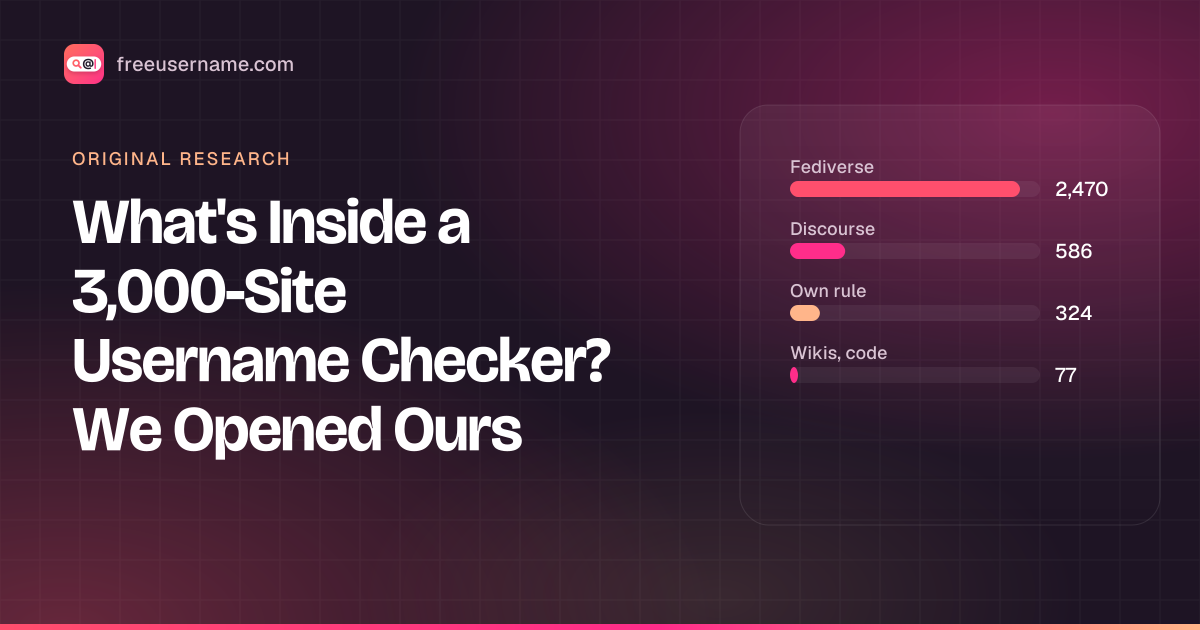
What's Inside a 3,000-Site Username Checker? We Opened Ours
Our username search checks 3,457 sites. 58 are major platforms; 91% run on about ten kinds of community software. The full breakdown, and what the number really means.
· 4 min read
- OSINT
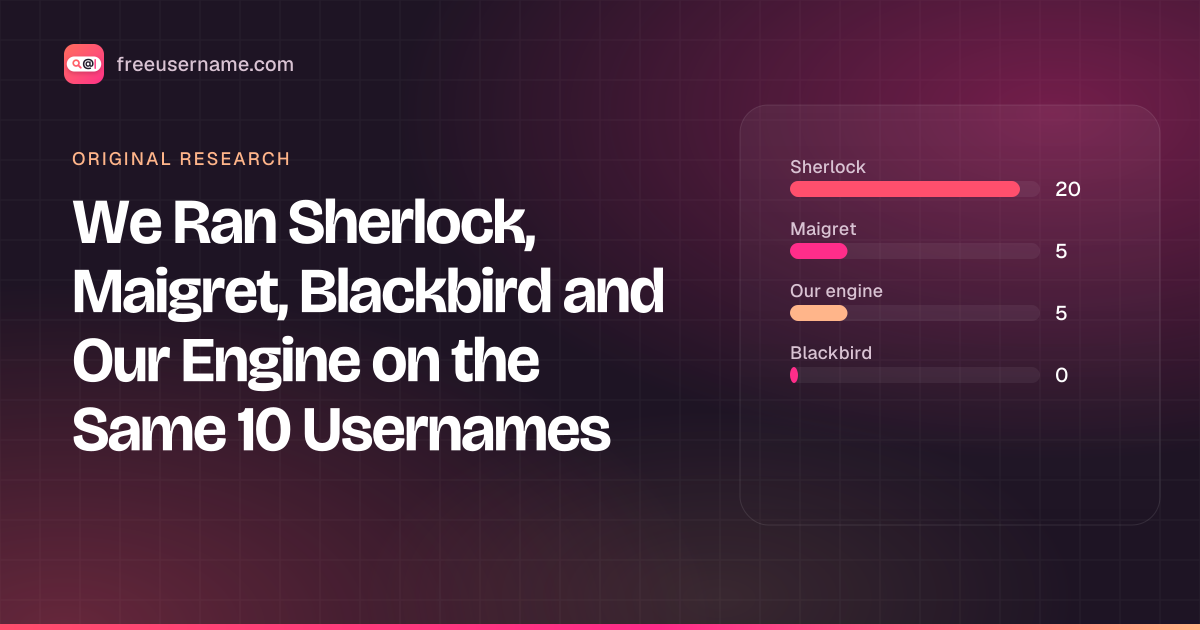
We Ran Sherlock, Maigret, Blackbird and Our Engine on the Same 10 Usernames
A reproducible test: 4 username tools, 10 handles, default settings. Hits, false positives on made-up names, errors and speed, with the raw CSV.
· 8 min read
- OSINT
Reverse Gamertag Lookup: Find a Player Across Games
Free gamertag lookup online: check one name on Xbox, PlayStation, Steam, Riot and more, do an Xbox gamertag search, then deep-search every site.
· 4 min read

More from the blog
- Cute Username Ideas: 65+ Soft, Aesthetic & Short Names
- WhatsMyName Apps Is Now FreeUsername: Our Rebrand
- Who Runs the Web's Profile Pages? 3,457 Sites Analysed (2026)
- The Username Format That Works on the Most Sites: We Tested 21 Formats Against 3,457 Sites’ Rules
- How to Find Someone's Alt Twitter (X) Account
- Username Availability Search: Is It Taken Everywhere?