
How to Protect Your Brand Name Across Social Media
By David James · Published · 5 min read · Editorial policy
Free, no sign-up. Checks 3,450+ sites; the username is not stored or logged.
Your brand name is one of the few things customers carry around in their heads. When they search for it on a platform and find someone else, or nothing at all, you lose a little trust each time. A name you never claimed is also free for squatters and impersonators to take.
Protecting a brand name online mostly comes down to a few dull tasks done early, then checked again from time to time. The plan below works for a side project or an established company.
Step 1: Audit where your name is already used
Before you claim anything, find out where your brand name already exists. You want a list of every platform where the exact handle is taken, along with a sense of who holds it.
The quickest way is a broad username search. The FreeUsername tool checks a handle against 3,450+ sites for free, with no sign-up, and streams results as they come in. Each site gets a status of Found, Not found, Blocked, or Unknown. For Found results it also pulls the public display name, avatar, and bio, so you can tell faster whether a profile is an abandoned test account, an unrelated person with the same name, or someone trading on your brand.
You can check up to five usernames at once, so include the obvious variations people might reach for:
- Your exact brand name, for example
acmecoffee - Common suffixes:
acmecoffeehq,acmecoffeeco,getacmecoffee - Separator variants, if platforms allow them:
acme_coffee,acme.coffee - Your shortest likely abbreviation
Export the results as CSV so you have a working checklist. Every result is a lead to confirm by visiting the page yourself.
Step 2: Claim your handle everywhere it is free
Go through your list and register the handle on every platform where it is available and relevant. Prioritize:
- Where your customers are now. The platforms you will actively post on.
- Where they might be next year. Fast-growing networks are where squatters move first.
- High-trust platforms. Code hosts, review sites, app marketplaces, and payment or tipping platforms are where impersonation causes real financial harm.
You do not need to post on every account. A claimed profile with your logo, a one-line bio, and a link to your main website is enough. It tells visitors the account is really yours, and it keeps the name out of anyone else's hands.
Use a shared, company-controlled email address for these registrations, turn on two-factor authentication, and store the credentials in a password manager the team can access. Brand accounts tied to one employee's personal email are a common source of lockouts when that person leaves.
Step 3: Lock down matching domains
A matching domain name is part of the same identity. The FreeUsername search checks whether your name is available as a .com, .net, .org, .io, .us, .app, or .dev domain using public RDAP registration data, right alongside the social results. If the .com is free, register it. If it is taken, decide whether the alternatives fit your brand, and consider registering a couple of them so that nobody else can set up a confusingly similar site.
Point every extra domain to your main website, so anyone who types the wrong extension still ends up in the right place.
Step 4: Make your real accounts easy to verify
Owning the names is half the job. People also need an easy way to tell which accounts are really yours.
- List your brand's profiles on your website, ideally in the footer or on a contact page. Customers can check that list when in doubt.
- Link back from each profile to your website. A two-way link is a simple trust signal.
- Use the same name, logo, and bio style everywhere. Consistency makes copycats stand out.
- Apply for verification on platforms that offer it to businesses, where it makes sense for you.
Step 5: Spot and handle impersonators
Some of the "Found" results from your audit will belong to people who simply share your name, and that is fine. Others may copy your logo, description, or product photos. Signs of impersonation include:
- Your logo or product images used as an avatar
- A bio that claims to be your company's real account
- Links to unfamiliar payment pages, giveaways, or "support" contacts
- A handle that is your name plus a small change, such as an extra letter or underscore
When you find one, take screenshots and note the profile URL and date. Then use the platform's impersonation or trademark reporting process. Most major platforms have a form for this. Do not engage with the account publicly, and do not try to "hack back" or pressure the owner. If the account is causing real harm to customers, warn your audience on your own channels and point them to your list of verified profiles.
If you hold a registered trademark, mention it in your report. Many platforms handle trademark complaints through a separate process that can move faster.
Step 6: Check back on a schedule
New platforms launch, abandoned accounts get recycled, and impersonators come and go. Put a recurring reminder on your calendar (quarterly is a reasonable start) to rerun a username search for your brand and its main variations. Compare the export against your previous one and look for new "Found" results on platforms where you did not have an account before.
Run it again whenever you launch a new product name, a campaign hashtag, or a sub-brand.
Know the limits of automated checks
Automated username checks are a fast way to get a broad view, but they have blind spots. Some sites block automated requests, which shows up as Blocked. Others return ambiguous pages, which shows up as Unknown. Websites change faster than any set of detection rules can keep up. Treat the scan as a map of where to look, then confirm the results that matter by visiting the pages yourself.
Starting a podcast under the brand? Before you record episode one, run through how to check a podcast name.
Quick brand protection checklist
- Run a username search for your brand and its variations
- Export the results and mark which platforms matter
- Claim free handles with a company email and two-factor authentication
- Register matching domains and redirect them to your site
- Publish a list of your brand's accounts on your website
- Report impersonators through each platform's reporting process
- Repeat the search every quarter and at every new launch
If you are still picking the name itself, start with our guide on choosing a unique username, then come back here once you have a shortlist. Whatever you find, use it to protect your own brand, not to track individual people.
Related tools
Check a username now. Free, no sign-up, 3,450+ sites.

Search usernames on your phone. Get the free Android app. Scans run on your device.

Related in Username tips
- Username tips
Cute Username Ideas: 65+ Soft, Aesthetic & Short Names
Cute username ideas for Instagram, TikTok, Roblox and Discord: soft, aesthetic, animal, food and short picks, how to make your own, and how to look up if one is free.
· 2 min read
- Username tips
WhatsMyName Apps Is Now FreeUsername: Our Rebrand
Our username search has a new name and a new home at freeusername.com. Same free tools, same 3,450+ sites, and every old link still works.
· 1 min read
- Username tips
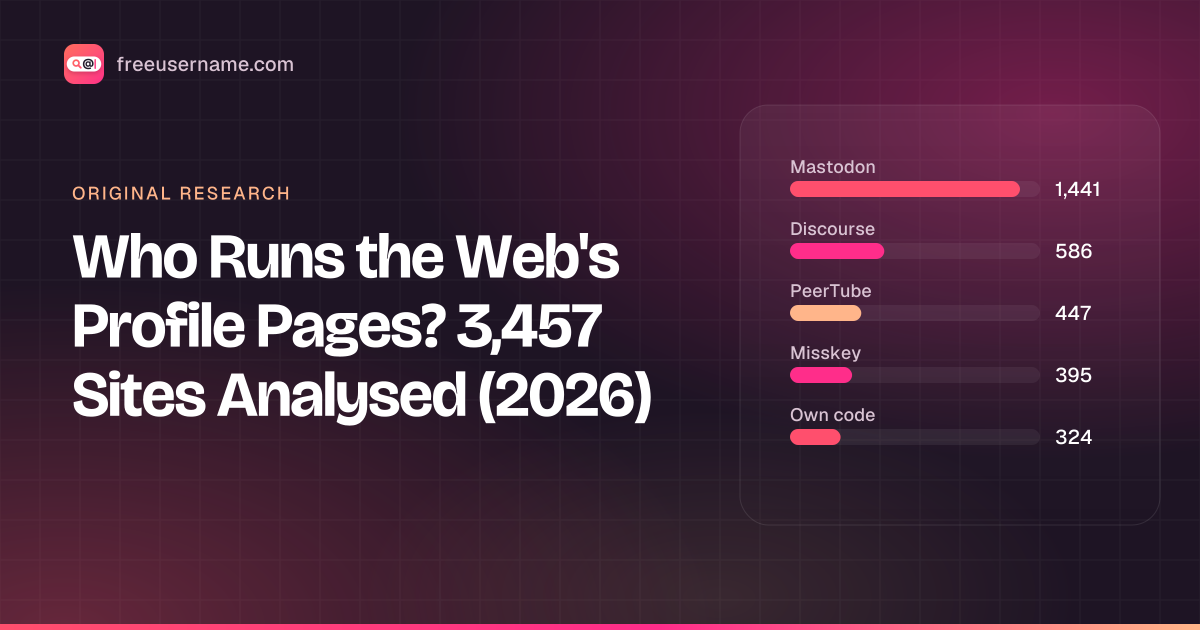
Who Runs the Web's Profile Pages? 3,457 Sites Analysed (2026)
Original data: 90.6% of the 3,457 sites in our username search run on 11 shared open-source platforms, and 71% are fediverse servers. What that means for your results.
· 6 min read
More from the blog
- What's Inside a 3,000-Site Username Checker? We Opened Ours
- We Ran Sherlock, Maigret, Blackbird and Our Engine on the Same 10 Usernames
- Reverse Gamertag Lookup: Find a Player Across Games
- How to Find Someone's Alt Twitter (X) Account
- Digital Footprint Check in Canada: Free, No Sign-Up
- PIPEDA Privacy Rights and Quebec Law 25, Explained